HDMI
HDMI (High-Definition Multimedia Interface) is an audio/video interface for transmitting uncompressed digital video and compressed or uncompressed digital audio from an HDMI-compliant source device to a compatible display. It replaced older analog standards like VGA and component video for consumer electronics. HDMI carries both high-definition video and multi-channel audio through a single cable.
Primary Use
Digital Audio & Video Output
Reference Image
Key Features
- Trapezoidal (wider on top) connector shape - distinctive and easy to recognize
- 19 pins in the standard Type A connector
- Carries both digital video AND audio in a single cable
- Supports HDCP (High-bandwidth Digital Content Protection) copy protection
- Hot-pluggable - can be connected/disconnected without powering off devices
- Supports resolutions from 720p up to 10K (depending on version)
- Supports ARC (Audio Return Channel) and eARC for sending audio back to receivers
- CEC (Consumer Electronics Control) allows devices to control each other
Variants & Standards
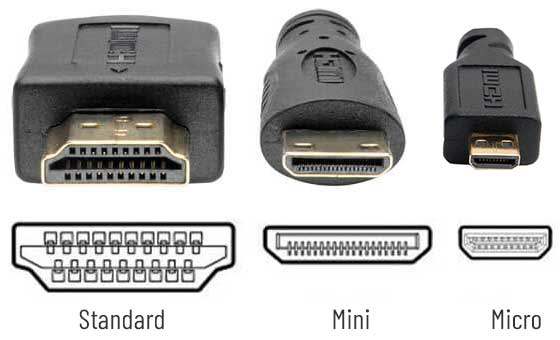
Type A (Standard)
Type C (Mini HDMI)
Type D (Micro HDMI)
HDMI 1.4
HDMI 2.0
HDMI 2.1
Quick ID Tips
1 Distinctive trapezoid shape - wider at the top, narrower at the bottom
2 Flat, thin connector profile compared to VGA or DVI
3 No thumbscrews or locking mechanism (just friction fit)
4 Standard size (Type A) is about 14mm wide
5 Mini and Micro versions are proportionally smaller but same trapezoid shape
6 Usually a black connector and cable
A+ Exam Notes
HDMI carries BOTH audio and video - unlike VGA (video only) or DVI (typically video only)
Know the three physical connector sizes: Standard (Type A), Mini (Type C), Micro (Type D)
HDMI 2.1 is required for 4K at 120Hz and 8K content
HDMI uses HDCP for content protection - important for streaming services
ARC/eARC allows audio to flow from the TV back to a soundbar/receiver over the same HDMI cable
At a Glance
Display / Audio-Video
6
8
5