Ethernet (RJ-45)
Ethernet cables use twisted pair copper wiring with an RJ-45 connector to provide wired network connectivity. They are the backbone of local area networks (LANs) and are used to connect computers, switches, routers, and other network devices. Ethernet cables follow the IEEE 802.3 standard and come in various categories that determine their maximum speed and bandwidth.
Primary Use
Networking & Data Transfer
Reference Image
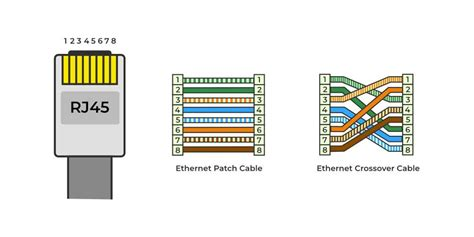
Key Features
- RJ-45 connector with 8 pins (4 twisted pairs)
- Clear plastic connector housing with a locking clip/tab
- Wider than a phone cable (RJ-11) - a common point of confusion
- Available in categories: Cat5, Cat5e, Cat6, Cat6a, Cat7, Cat8
- Maximum cable length of 100 meters (328 feet) for most categories
- Wiring standards: T-568A and T-568B color-coded pin configurations
- Can be straight-through (device to switch) or crossover (device to device)
- Shielded (STP) and unshielded (UTP) variants available
Variants & Standards
Cat5
Cat5e (Enhanced)
Cat6
Cat6a (Augmented)
Cat7
Cat8
Quick ID Tips
1 Look for the clear plastic RJ-45 connector - it is wider than a phone jack (RJ-11)
2 Has a plastic locking clip/tab on one side that clicks when inserted
3 8 gold-colored metal contacts visible through the clear connector
4 Cable is typically round and thicker than a phone cord
5 Often color-coded by category: blue is most common for patch cables
A+ Exam Notes
Know the difference between RJ-45 (Ethernet) and RJ-11 (phone) connectors
T-568B is the most common wiring standard in commercial installations
Crossover cables swap transmit and receive pairs - used for direct device-to-device connections
Cat5e is the minimum recommended for Gigabit Ethernet
Cat6a supports 10 Gbps at the full 100-meter distance
PoE (Power over Ethernet) can deliver both data and electrical power over Ethernet cables
At a Glance
Networking
6
8
6